An industrial computer is a ruggedized computing platform designed for reliability. They are engineered to run for 7 to 15 years, often in industrial environments that would destroy a consumer PC in days. They use fanless cooling, wide-temperature components, and sealed enclosures to survive dust, vibration, moisture, and temperature extremes.
Industrial PCs first appeared in the 1980s as 4U rackmount IBM PC-based units. Today they range from palm-sized embedded boards to vehicle-mount terminals, deployed across manufacturing, energy, transportation, logistics, and defense. They serve as HMI stations, edge AI inference nodes, protocol gateways, and data historians. Common processors include Intel Atom for low-power edge tasks and Intel Core or AMD Ryzen Embedded for compute-intensive workloads.
This article covers the form factors, certifications, edge computing roles, and total cost of ownership that define industrial PCs and help you choose the right system for your deployment.
6 Types Industrial Computer
Each zone in a factory requires a different type of equipment. A touchscreen at the operator station, a sealed fanless unit beside the CNC machine, a compact gateway inside the control cabinet. The six types below cover the full range of industrial deployments.
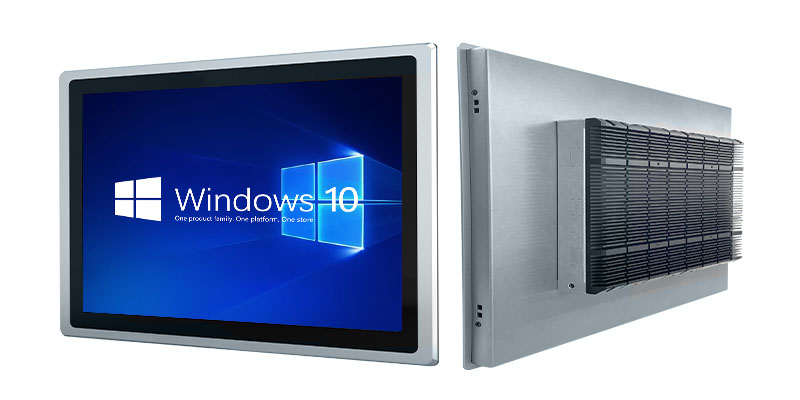
- Panel PC: An all-in-one unit with an integrated touchscreen, built for operator stations and HMI dashboards. Typically wall-mounted or arm-mounted at the production line for direct process interaction. Screen sizes range from 7 to 24 inches, and some are even with projected capacitive touch that works through gloves.
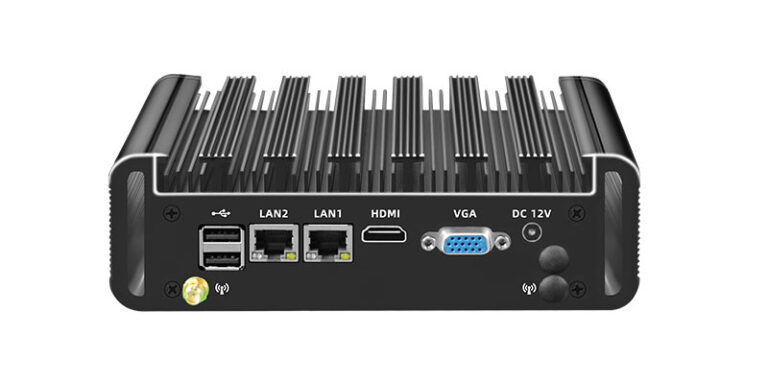
- Box PC: A fanless, fully sealed enclosure designed for machine-side deployment. Ideal for dusty, wet, or vibration-heavy environments. Box PCs are often IP65-rated and VESA-mountable, making them versatile for both factory floors and outdoor smart city installations.
- Rack-mount (1U to 4U): Server-class industrial PCs installed in 19-inch racks inside control rooms. Used for MES servers, data historians, and centralized SCADA platforms that require high compute density. These units support redundant power supplies and hot-swappable storage for continuous uptime.
- DIN-rail: A compact, cabinet-mount unit that sits alongside PLCs and terminal blocks on standard 35mm DIN rail. This space-saving IPC is the go-to for edge computing inside control cabinets. Primary role: protocol conversion (RS-485 to OPC-UA, for example) and local data aggregation before cloud transmission.
- Embedded SBC (Single-Board Computer): An OEM-ready board designed for integration into proprietary equipment. Machine builders embed these directly into medical imaging devices, self-service kiosks, and automated test fixtures. Custom carrier boards allow tailored I/O without redesigning the compute core.
- Vehicle-mount: A vibration-dampened terminal with sunlight-readable display, built for forklifts, AGVs, AMRs, and fleet vehicles. Designed to withstand constant shock (up to 50G) and wide temperature swings during mobile operation. These units typically include hot-swappable batteries and integrated GPS/WLAN/WWAN connectivity.
Choose Correct Certifications
Choosing the wrong certification can void warranties, lead to compliance issues, and potentially delay customs clearance. The expenses associated with re-specifying after a failed audit typically surpass the initial costs of correct specifications. It’s crucial to align your certification with the deployment environment rather than simply focusing on budget constraints.
MIL-STD-810 is the U.S. Department of Defense standard for environmental testing. It covers drops, shocks, vibration, humidity, altitude, rain, dust, and temperature extremes across 28 test methods. If your deployment involves defense, field service, or extreme outdoor conditions, this is the benchmark.
IEC 60068 is the internationally recognized equivalent for non-defense applications. Most industrial PC manufacturers test against IEC 60068 for commercial and industrial deployments. If you are selling into markets outside the U.S., IEC 60068 compliance is typically the baseline requirement.
IP ratings define ingress protection against solids and liquids:
- IP65: dust-tight, protected against water jets. Required for food processing washdown environments.
- IP67: dust-tight, protected against temporary submersion up to 1 meter.
- IP69K: Rated for high-pressure, high-temperature washdowns; essential for food processing and medical sectors.
Operating temperature is specified alongside IP ratings. Standard industrial PCs cover -20°C to 60°C. Wide-temperature models rated at -40°C to 70°C use soldered memory, conformal-coated boards, and industrial-grade capacitors to survive thermal extremes in steel mills, cold-chain logistics, and outdoor kiosks.
CE and FCC are electromagnetic compatibility certifications required for market access in Europe and the United States, respectively. Without CE marking, you cannot legally deploy equipment in the EU. FCC Part 15 compliance is required for any electronic device sold in the U.S.
RoHS restricts hazardous substances such as lead and mercury. It is mandatory for any product entering the EU market.
ATEX/IECEx certification is required for equipment deployed in explosive atmospheres, including oil and gas platforms, chemical plants, grain processing facilities, and paint shops. Deploying non-certified equipment in these zones is a safety violation and carries significant legal liability.
Edge Computing, IIoT, and the Expanding Role of Industrial PCs
Industrial PCs are no longer just HMI terminals. They have become edge AI inference nodes, protocol converters, and IIoT gateways that process data locally before anything reaches the cloud. This shift reduces cloud dependency and keeps critical decisions close to the process.
Edge gateway role. A DIN-rail or Box PC aggregates data from PLCs, sensors, and field devices, then filters and forwards it via MQTT or OPC-UA. This reduces cloud bandwidth consumption by 60% to 90% and keeps latency-sensitive decisions on the factory floor. A single edge gateway can normalize data from dozens of RS-485 Modbus RTU devices into a unified OPC-UA namespace for upstream systems.
Local AI inference. GPU-equipped and NPU-equipped industrial PCs now run machine vision models directly at the production line. Quality inspection, defect detection, and barcode verification happen in real time without round-tripping to a remote server. This is critical in high-speed manufacturing where even 50ms of network latency causes missed inspections. Common accelerator options include NVIDIA Jetson modules, Intel Movidius VPUs, and dedicated NPUs on newer SoCs.
OS landscape. The operating system choice depends on the workload:
- Windows LTSC: 10-year support lifecycle, preferred for legacy SCADA and HMI software.
- Linux: lightweight, containerized edge workloads using Docker or Kubernetes at the edge.
- RTOS (real-time OS): deterministic control loops where microsecond-level timing is non-negotiable.
OEM/ODM customization. Machine builders and systems integrators work with manufacturers like us at IPCmate to configure custom I/O layouts, BIOS-level tuning, and branded enclosures. Common customizations include adding isolated serial ports, configuring watchdog timers, and locking down boot sequences for security-sensitive deployments.
Industrial software platforms (SCADA, MES, DCS, and historian systems) all run natively on these machines.
Total Cost: Industrial vs Consumer PCs Over 10 Years
An industrial PC costs 2x to 5x more upfront than a consumer PC with equivalent processing specs. A typical industrial Box PC runs $2,500 where a comparable consumer desktop costs $600. That gap closes fast when you calculate total cost of ownership over a 5 to 10 year horizon.
Replacement cycles. One industrial PC serves 10-year. A consumer PC in the same role requires 3 to 4 replacements over that period. Each swap carries costs: procurement, imaging, integration testing, re-certification, and production downtime during changeover. Across dozens or hundreds of stations in a plant, replacement costs alone can exceed the upfront premium of industrial hardware.
Downtime cost. Unplanned downtime in manufacturing costs $5,000 to $50,000 per minute depending on the industry. A single failure event on a consumer PC controlling a bottleneck process can erase the entire upfront savings. In automotive and semiconductor fabs, scrap, rework, and missed delivery penalties push that figure toward the upper range.
MTBF savings. Every additional 10,000 hours of mean time between failures saves approximately $740,000 per year in factory maintenance costs. Industrial PCs are designed with wide-temperature components, solid-state storage, and fanless cooling specifically to push MTBF higher.
Hidden consumer costs. Each time you replace a consumer PC, you face driver compatibility issues, OS re-certification against your SCADA platform, potential retraining, and integration rework. These soft costs compound with every replacement cycle.Lifecycle support. Industrial PC manufacturers guarantee 7 to 15 years of spare parts availability, BIOS updates, and driver support. Consumer motherboards are discontinued within 1 to 2 years of release. When you model TCO across a full deployment lifecycle, the industrial PC is the lower-cost option.
Industrial Computer vs Consumer PC: Key Differences
The differences between an industrial computer and a consumer PC are measurable across every critical dimension. The table below gives you the numbers to justify the spec delta to stakeholders.
| Dimension | Industrial PC | Consumer PC |
|---|---|---|
| Operating temperature | -40°C to 70°C | 0°C to 40°C |
| Vibration/shock | Up to 50G shock, 5-2000 Hz random vibration | No rating |
| IP rating | IP65/IP67 washdown-capable enclosures | Open-vent chassis, no ingress protection |
| Product lifecycle | 7-15 years | ~12 months before discontinuation |
| MTBF | 100,000+ hours | 30,000-50,000 hours typical |
| I/O interfaces | RS-232, RS-485, CAN bus, isolated DIO, GPIO, PoE | USB, HDMI, consumer Ethernet |
| OS support | Windows LTSC (10-year lifecycle), Linux LTS, RTOS | Consumer Windows with feature updates every 6 months |
Temperature. Industrial PCs use wide-temperature rated components, soldered (not socketed) memory, and conformal-coated boards to survive -40°C to 70°C. Consumer PCs throttle or shut down outside their narrow 0-40°C range. In cold-chain logistics, outdoor kiosks, and steel mills, this temperature resilience is not optional.
Vibration and shock. Industrial PCs are tested to withstand up to 50G shock and 5-2000 Hz random vibration for sustained periods. Consumer PCs have no vibration rating. A standard desktop hard drive fails from vibration levels that an industrial SSD-based system handles routinely.
I/O density. Factory automation requires RS-232 for point-to-point serial devices, RS-485 for multi-point Modbus RTU sensor buses, and CAN bus for automotive and mobile machinery. Isolated digital I/O and GPIO pins allow direct sensor and actuator connections. Consumer PCs offer none of these interfaces natively, requiring external converters that add cost, latency, and failure points.
OS longevity. Windows LTSC provides a stable, 10-year platform with no forced feature updates. This is critical for validated SCADA and MES environments where every OS change triggers re-qualification.
FAQ
What is the difference between an industrial computer and a PLC?
A PLC (Programmable Logic Controller) is a dedicated real-time controller designed for discrete I/O control, such as switching valves and motors. An industrial computer is a general-purpose computing platform that runs full operating systems and software applications like SCADA, MES, and AI inference. Many systems use both: the PLC handles deterministic control while the industrial PC manages visualization, data logging, and analytics.
Why are most industrial computers fanless?
Fans are the most common point of mechanical failure. They pull dust, moisture, and contaminants into the enclosure, accelerating component degradation. Fanless industrial PCs use passive heatsink designs and wide-temperature components to dissipate heat without moving parts. This extends MTBF and enables sealed IP65/IP67 enclosures for harsh environments.
How long does an industrial computer last?
A well-specified industrial PC operates reliably for 7 to 15 years. This lifecycle is supported by wide-temperature components, solid-state storage, fanless cooling, and manufacturer commitments to long-term spare parts and driver availability. Consumer PCs in industrial roles rarely survive beyond 2 to 3 years.
Can industrial computers be used in hazardous (explosive) environments?
Yes, but only with ATEX (EU) or IECEx (international) certification. These certifications verify that the equipment will not ignite flammable gases, dust, or vapors. Deploying non-certified hardware in these zones violates safety regulations.
Can I use a consumer PC instead of an industrial computer?
You can, but the total cost will likely be higher. Consumer PCs lack the temperature range, vibration resistance, IP-rated enclosures, and industrial I/O that factory environments demand. For any deployment expected to last more than 2 to 3 years in a non-office environment, an industrial PC delivers lower TCO through fewer replacements, less downtime, and reduced re-integration costs.